Day 4: Basic Linux Shell Scripting for DevOps Engineers
Hello, I started my journey as a software tester and later discovered that I am interested in DevOps. So as a transiting of career to DevOps engineer. I am practicing the #100daysofdevops Challenge for self-improvement and learning the process of DevOps. I am sharing my experience with you, you can contact me at vishalabhosale30@gmail.com
Shell Scripting
Usually, shells are interactive, which means they accept commands as input from users and execute them. However, sometimes we want to execute a bunch of commands routinely, so we have to type in all commands each time in the terminal.
As a shell can also take commands as input from file, we can write these commands in a file and can execute them in shell to avoid this repetitive work. These files are called Shell Scripts, Each shell script is saved with .sh file extension e.g., myscript.sh.
A shell script has syntax just like any other programming language. If you have any prior experience with any programming language like Python, C/C++ etc. It would be very easy to get started with it.
A shell script comprises the following elements –
Shell Keywords – if, else, break etc.
Shell commands – cd, ls, echo, pwd, touch etc.
Functions
Control flow – if..then..else, case and shell loops etc.
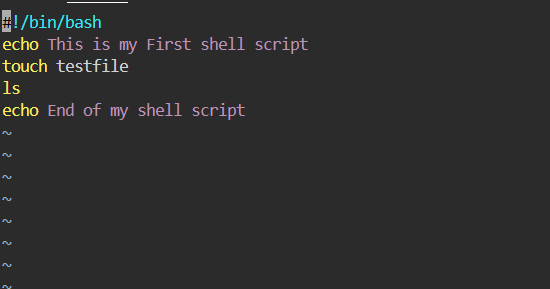
Lets have a look on our First program
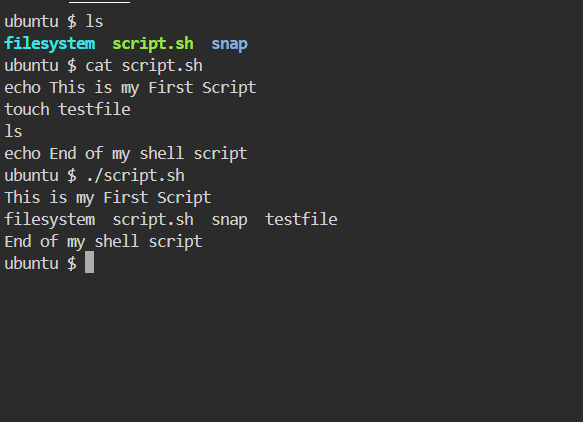
#!” on top of the script file, followed by the absolute path of the shell of choice. To specify bash as an interpreter, Add the following line on top of the shell script.
Comparison Operators
You can compare two variables in shell scripting. We do these comparisons to make decisions, we will see how to do that later in this article, but before that, here is a list of some comparison operators.
Integer comparison
| Operator | Description |
| -eq | is equal to |
| -ne | is not equal to |
| -gt | is greater than |
| -ge | is greater than or equal to |
| -lt | is less than |
| -le | is less than or equal to |
String Comparison
| Operator | Description |
| \== | is equal to |
| != | is not equal to |
| \< | is less than, in ASCII alphabetical order |
| \> | is greater than, in ASCII alphabetical order |
We add a \ before < and > because they need to be escaped when typed in the [ ] construct. Now, let’s see where these are used.
Conditional statements
Conditional statements are used to execute a block of code only when certain conditions are met. Shell scripts support the use of conditional statements. We use comparison operators to check the conditions. Let’s see a few conditional statements.
If statement
It checks the condition, and if it is conditioned true, it executes the commands.
Syntax
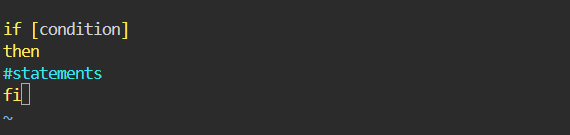
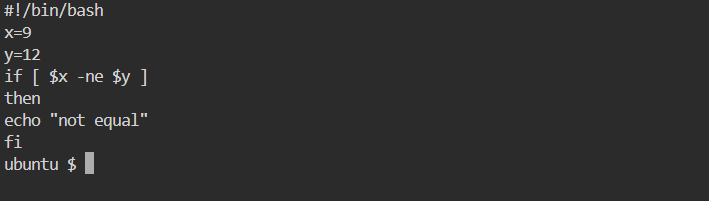
let’s take an example,
If-else statement
In an if-else statement, you can specify a set of commands to run if the condition is not met.
Syntax
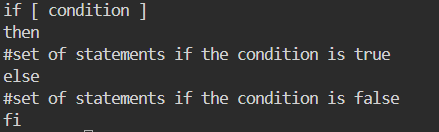
Let’s see an example

the Loops and For-Loops concepts are pending, hands-on practice is important for learning shell scripts.